Faithful First, Then Let Go: Recompilers & Renders
Months spent building faithful renderers, then realizing I had boxed myself in with them. Custom renderers, adaptive widescreen, and higher frame rates across my recomp ecosystems.

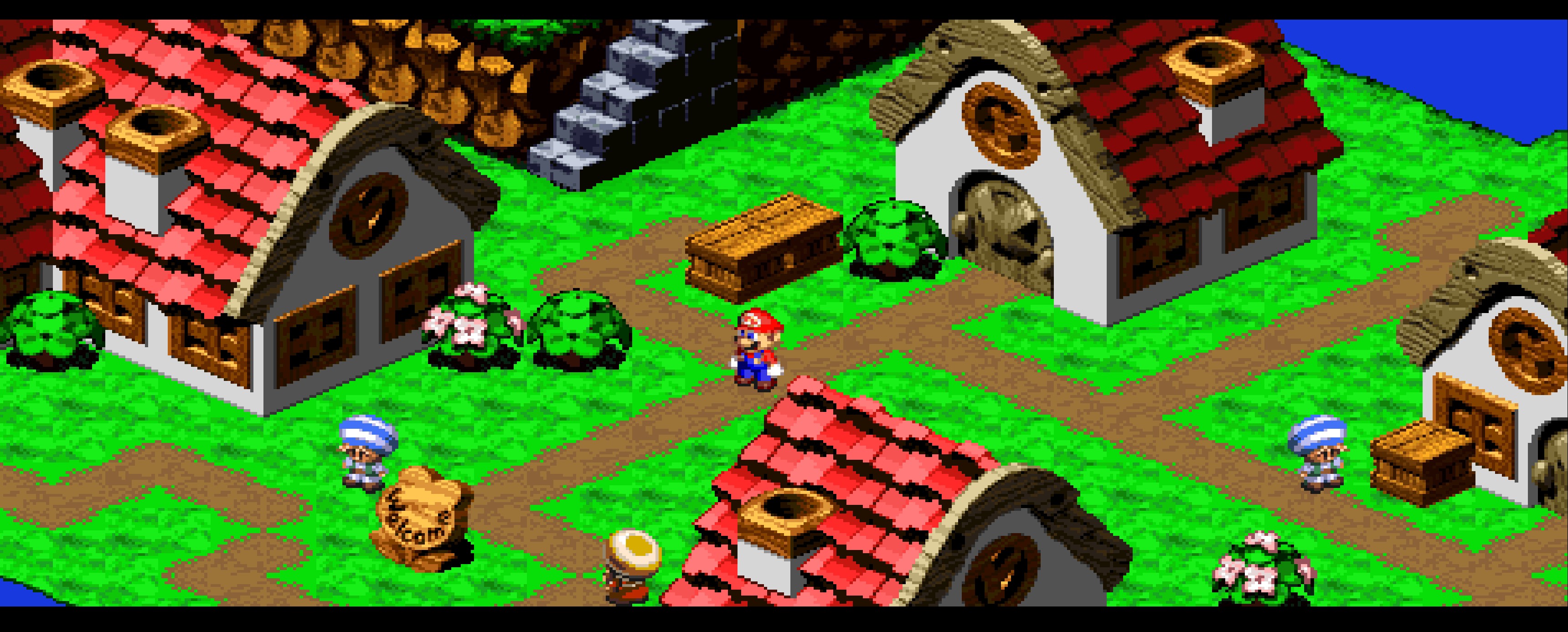
For a long time now, nearly everything I've written here has been about being faithful. LLE first. Get the hardware right. Get the ecosystems resilient. Build something good enough that a speedrunner can sit down, pull off their techs, and not feel a difference.
To me, these past months have been exciting. To build a re-usable foundation and walk before I (now, many of us who have joined me on this journey) can run. But to many others, I think they've been confusing, if not boring. A common incorrect I see is that I'm building nothing more than "prepackaged emulators", but this couldn't be further from the truth. And today is a simple example of what it means to begin to break that foundation in one of many ways.
The foundation
A lot of decomps and similar projects go straight to that fun part. Widescreen, higher frame rates, mods, new content. I understand why. It's the part people want to see, and it's the part that gets shared. But the fun part is only as good as what sits underneath it, and what sits underneath it is the part that's easiest to want to skip.
I've tried very hard not to skip it. Every one of my ecosystems starts from a faithful floor: the real BIOS where I can get it, coprocessors modeled against their actual behavior, output compared against an emulator oracle (or real hardware, where no good oracle exists). Every game stood up on a framework exposes some assumption hiding in it, and fixing that assumption makes every other game on it better.
That's the unglamorous work, and it's what we've built. A foundation to trust.
Caught in my own trap
The entire point of a faithful floor is that you can swap parts out on top of it. A faithful renderer is a reference, not a ceiling. I've said as much in more than one of these posts. And yet, I got caught in my own trap.
Every time I went after widescreen, I tried to bend the renderer I had already shipped. The one built to reproduce exactly what the original hardware would draw, at exactly the resolution it would draw it. Widening it meant fighting it. BG layers wouldn't cooperate past 4:3, edges would come out garbled. I was so fixated on building the faithful base, with the full intention of swapping parts out for enhancements later, that I forgot to actually do the swapping. I boxed myself in with the very renderers I shipped to be the ground floor and was trying to reconstruct information that'd already been thrown away and staple it back in.
Borrowing a renderer
What got me out was Star Fox Enhanced by kandowontu.
I've touched on this briefly in A week with Astra, but it deserves more than a paragraph. I had been working on Star Fox under snesrecomp for some time to prove out the Super FX chip, and widescreen just would not cooperate. kandowontu's project is a decomp rather than a recomp, but it had a renderer doing exactly what I had been failing to do. But as I've covered before, that decomps and recomps aren't so different. Just because it was a decomp doesn't mean I couldn't do it, too.
kandowontu was extremely welcoming, and with his permission, I adapted his renderer implementation into my own StarFoxSNESRecomp. A very special thank you to him for that. To be clear, as noted on my repo's README, his starfox-enhanced is the authoritative Star Fox PC port. Mine is a development reference. If you want the full Star Fox experience, go play his.
The real lesson wasn't the renderer itself, though. It was the pattern.
The faithful renderer stays exactly as it is: authoritative, and the default. A separate custom renderer reads the same game state and is free to present it however it wants. Wider. At a higher frame rate. Turn it off and you're right back to the authentic output. Turn it on and the game is no longer bound to the screen it shipped on.
Once that clicked, I took the pattern and carried it across all of my games and ecosystems.
The showcase
What follows is a handful of titles across NES, SNES, Game Boy Color, Sega Genesis, PlayStation, and Virtual Boy, all running on custom renderers, all with increased frame rates. Some of these are titles I spent months building up faithfully, now pushed to boundaries they were never designed for.
Some of the videos may be a bit hard to watch, because YouTube, or your screen/browser is going to try and condense it into your likely 16:9-ish aspect ratio. For a lot of these, they won't have a consistent output aspect ratio beyond "it's wide". The reason for that is, all of these games are able to dynamically modify their display and rendering logic in real time to adjust to the window's size. For many of them, I made them windowed on my 21:9 monitor and just drug the window out by hand. As a result, your aspect ratios are all over the play. I'd estimate these titles are anywhere from 21:9 to up to 80:9 depending on where my mouse landed.
SNES
Super Mario World (SNES)
Megaman X (SNES)
F-Zero (SNES)
NES
Super Mario Bros (NES)
Super Mario Bros 2 (NES)
Metroid (NES), adaptive widescreen
Kirby's Adventure (NES)
Game Boy Color
Super Mario Land 2: 6 Golden Coins (GBC)
PlayStation
Tomba! (PS1)
Megaman X6 (PS1)
Sega Genesis
Sonic the Hedgehog 3 & Knuckles (Genesis)
Virtual Boy
Virtual Boy Wario Land, adaptive widescreen and color
Gotchas along the way
It can effectively go any aspect ratio. Because the custom renderer isn't tied to the original screen, it isn't tied to a fixed set of presets either. 16:9, 21:9, 32:9, or just whatever shape your window happens to be. That's what "adaptive" means here: the view follows the window, not the other way around.
Go wide enough, and the machine starts to feel it. More of the world on screen means more to draw and more going on every frame. Push far enough out, and it starts to cause real performance issues on the machine for just how much it's trying to do at once. Static recompilation buys a lot of headroom over emulation, but that headroom isn't infinite.
Every game still takes care. A custom renderer isn't a universal switch to flip. Gameplay can go wide, but menus, briefings, and screens the game never expected to be wide are often better left centered. HUDs need re-anchoring. Actors that were culled just off the original screen edge suddenly have an audience. Each title needs its own integration, and that's where most of the effort goes.
For some games, those adjustments may not be reconcileable. For games like F-Zero, the extended space is pure benefit. It's a nicer experience. But for a game like Super Mario Bros, actors being live once they're on screen can significantly change timing to how they'd respond or interact in an environment, and can throw off pacing drastically.
Both directions: Pokémon Emerald on Android
Nearly all of the above is about going wider. But adaptive doesn't have to only mean horizontal. I wanted to push both axes, vertical and horizontal, and I picked a use case where that actually matters.
I ported Pokémon Emerald to Android, on top of GBARecomp, with the ability to dynamically resize between portrait and landscape. Rotate the phone, and the game keeps going while the view reshapes itself around it. The two images below are the same game session. I just rotated the phone.
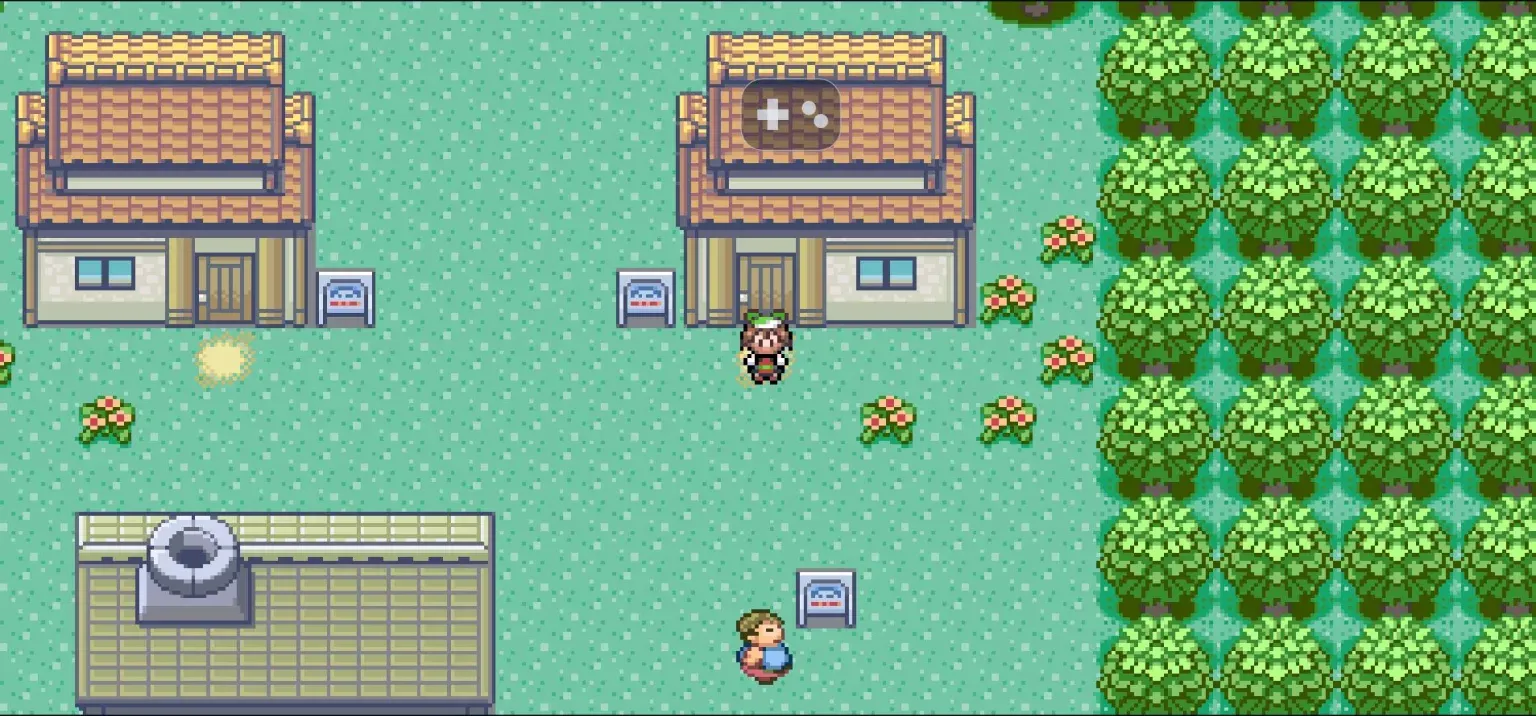
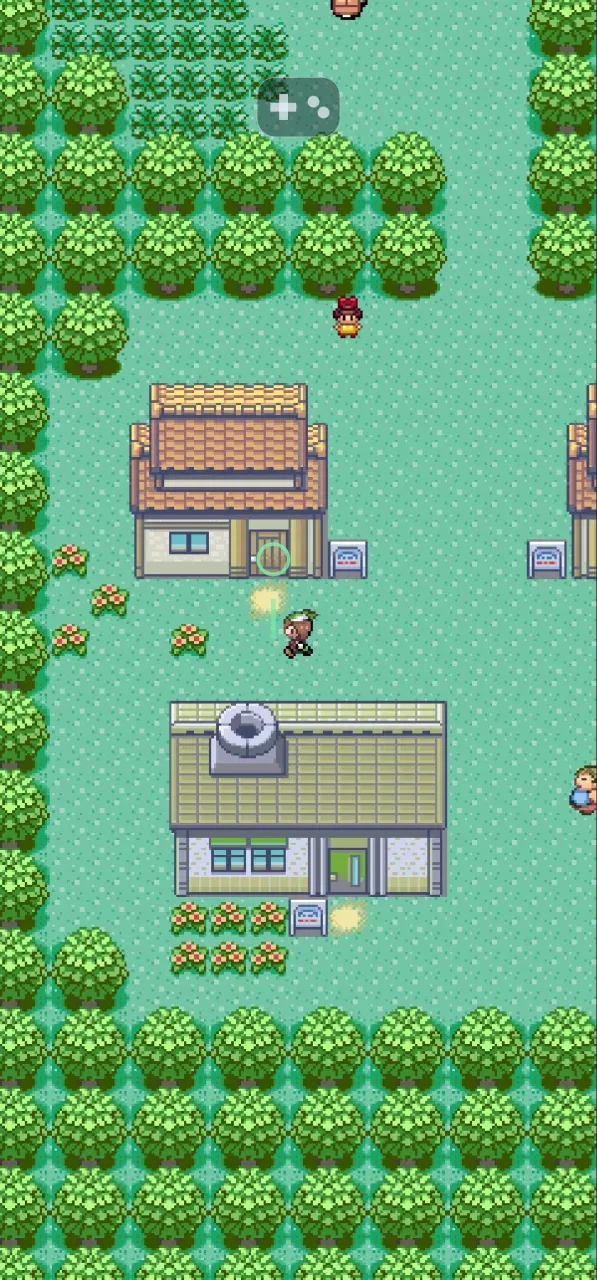
The second half of this was controls. Nobody wants to play a Pokémon game on a phone with a virtual D-pad covering the screen, so I used the game's decompilation to build touch-friendly controls and gesture based navigation:
- Draw a path, or tap to walk. Trace a line and the player follows it. The route planner mirrors the game's own movement and collision rules, read from live game state, so it respects walls, ledges, water, and NPCs just as the game would.
- Tap to interact. Tap a person, sign, or door and the player walks up to it and interacts.
- Tap menus and battles directly. Tapping a menu item or battle option moves the game's own cursor there and confirms it, so all the original sounds and redraws happen just as they would with a D-pad.
- Long-press for Start.
Importantly, none of this modifies the game. The touch layer only reads game state and steers it with synthesized button presses, and every step it takes is checked against what the game actually did. This is the decomp-annotated recomp idea put to work: the recompilation runs the game, and the decompilation tells the touch layer where the cursor, the menus, and the collision map live.
Closing
I still believe the foundation comes first. None of what's shown here would hold up without the months of making these ecosystems faithful underneath it, and the faithful path is always one toggle away.
But a foundation is meant to be built on. It took borrowing someone else's renderer for me to remember that. Now that I have, I'm excited to see how far these old games can go and where the community takes these ideas.